Wednesday, February 22, 2012

Dresden Plate Applique

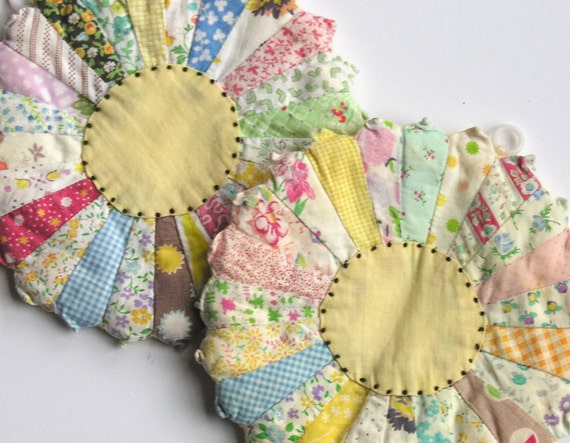
Years ago I found these 'Dresden Plate' applique panels in my late Grandma Beck's things.  They look like they were worked in the 40s or 50s, lovely old printed cottons.  My Grandma saved every bit of fabric, it doesn't surprise me that she tried her hand at these patterns that use up the smallest scraps.


I am contemplating what to do with them, there are five which makes a bed size quilt a tricky proposition.  Maybe a smaller quilt with four of the plates, and one framed to hang?  They are worked on to unbleached calico, and some of the basting stitches haven't even been removed.  My Grandma sewed a lot, but this is the only quilt I've ever seen of hers, I'm delighted she never finished it or she would have given it away.

I love paper piecing anyway, so I think this pattern might work really well for me.  I've been looking at other Dresden Plate variations on Pinterest, lots of beautiful work there.  I'd like to try it in some of my own colours and mixing in some lace and buttons as I normally use.  Here are some other plate patterns I love!

A gorgeous wall hanging by blogger Retro Mama:

Vintage Dresden Plate potholders from Etsy seller Vera Viola

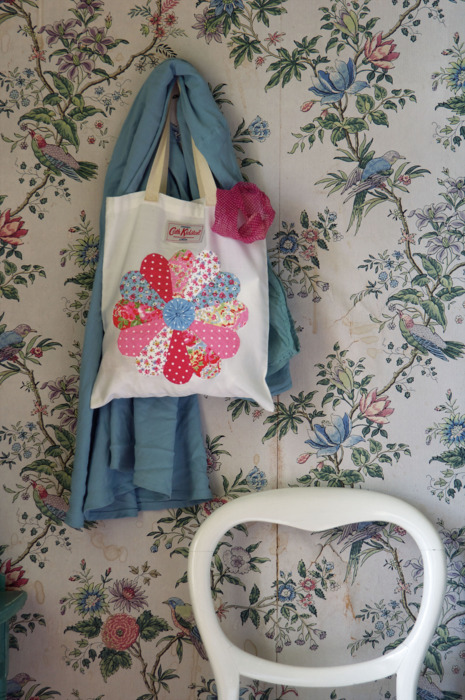
And a cute version from Cath Kidston that uses a yoyo for the centre:

Looking at these, I think my Grandma's are the nicest!  The colours are still beautiful after being stored for all these years.

Monday, October 10, 2011

cake and company


Henry and I spent Sunday berry picking with friends on the road near their farm, before being treated to tea and homemade cream cake.  We decided that we'd take our chances despite the grey skies and were surprised when the sun came out and we had to shed our jackets.  Lots of jam making today!


Monday, October 3, 2011

back to where you once belonged


I'm really working hard to get back into my creative groove, feeling really good about my work and staying motivated!  And a big part of that for me has always been being active online, instead of passive...I've gotten into bad habits this year of online time wasting--and not the good, tumblr/pinterest kind--which I'm determined to kick.  So that means back to blogging and image sharing and interacting with other artists.  This is going to be good!

Wednesday, December 8, 2010

warming up cold light in winter photos

I have been struggling to take item photos lately, as the cold winter light robs my items of their true colours. I listed six new items, only to have those photos look terrible in comparison to item photos I took in the summer and autumn light! I was really disappointed, especially as most of the items were made of cozy wool felt and really suffered from the grey light.

However, I found a quick fix for the problem, and I thought I'd share it for other Etsy sellers who might struggle with the same issues. I am using Photoshop Elements 7, but this works in regular Photoshop, too.  It can be accomplished in GIMP, as well, doing it step by step.

This is the original photo, I have already corrected the darkness of the photo buy bringing up the brightness and contrast.  Slightly over-exposed  photos with lots of contrast look really good on Etsy, I find. However, you can see how the cold winter light leaves a grey cast on the photo, the creamy bainin wool looks grey and dingy.
The solution I found is to use one of the actions created for photoshop by The Pioneer Woman, the food and lifestyle blogger who also has a photography section.  These actions are amazing!  A lot of the arty actions change the colours too much to be suitable for Etsy, but many of the subtle light and sharpness actions are perfect for the job. I used the 'warmer' action on this photo, and the change was amazing!  Perfectly rendered warm, creamy wool, just as the item appears in real life.
I was so happy with the result!  Looking at my Etsy shop, the new items blended in with the rest of the shop so much better, and I was able to correct all of the photos from six listings in a quarter of an hour.  As I mentioned, I use Photoshop Elements, and there are versions for Elements on her blog as well.  If you use GIMP or similar, the same effect can be effected by creating a new layer and filling it with a medium caramel colour, and then setting that layer to 'soft light'.  You can adjust the transparency of the fill layer to get just the right amount of warmth to your photo.

Here's another example of using the 'warmer' action, side by side so you can see how much of a difference it makes...it is subtle, but really effective:
If you need any help installing the actions, this page is really helpful...it's tricky to install them, so set up a shorcut on your desktop to drop them into once you found the right file.  Actions are a lot of fun to use, you can get a lot of the same effects that professional photographers use, and there are many free ones online, and even some for sale that are well worth it.

I hope this was helpful to someone!  If anyone has advice for how to overcome this problem in other programs and editors, please leave a comment.  I think that good photos on Etsy make us all look more professional, it's the most important part of selling, I work hard at it!